


tbset.h. In most situations the only parameters that will be needed are SZ_COLNAME and TBL_NROWS.
These three are used for declaring the sizes of char variables for column names, units, and print formats.
SZ_COLNAME - Maximum length of a column name
SZ_COLUNITS - Maximum length of string for units
SZ_COLFMT - Maximum length for print format

Generated with CERN WebMaker
Table E.7:
These may be set by tbpset or read by tbpsta. Parameters Non-settable Parameters Read by tbpsta.TBL_ROWLEN and TBL_INCR_ROWLEN are relevant only to row-ordered tables, while TBL_ALLROWS and TBL_INCR_ALLROWS are relevant only to column-ordered tables. TBL_ROWLEN is for setting the row length to a specific value. In contrast, TBL_INCR_ROWLEN is used to increase the row length by the specified amount over its current value, whatever that may be. The latter is more useful. When creating a new table, we suggest the following procedure for a row-ordered table. After calling tbtopn, define columns using tbcdef. Then the row length will be sufficient for the columns that have been defined. If you will need to define more columns after the table has been created, you can call tbpset with TBL_INCL_ROWLEN to preallocate the needed space before creating the table with tbtcre. The numerical value would be one for each single-precision or integer column, and two for each double-precision column. For character strings, divide the maximum string length by the number of bytes in a single-precision variable and round up.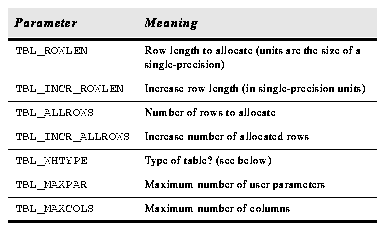
Table E.8: Table Parameters That Can be Read or Set.
The table type as set or read using TBL_WHTYPE is defined byt the parameters in Table E.9.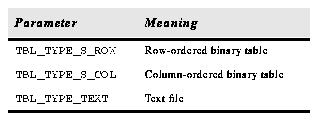
Table E.9: Table Types.
The parameters described in Table E.10 have to do with the file size and file I/O buffer size.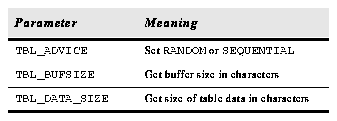
Table E.10: Table Size and File I/O Buffer Size.
The parameters are for getting information about a column using tbcigt or tbcigi.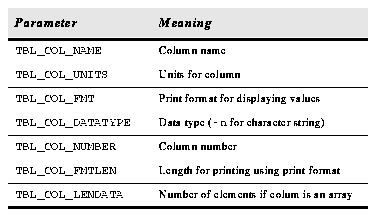
Table E.11:
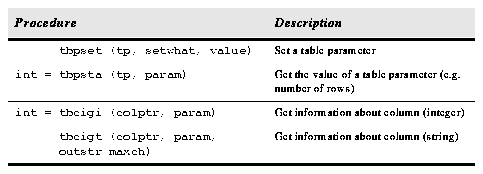
Getting Column Information.Table E.12: Table Parameter Procedures.